

Wi-Fi upgrade
Fixed quoteafter site visit
Suitable for
Offices with slow spots, dropouts or more devices than the old router can handle.
- Coverage survey of your floor
- Ceiling-mounted access points
- A data cable to each one
- Separate guest network

From a single access point to a full office fitout. We supply, install, label and document your physical IT, then hand it to the same team that supports it.
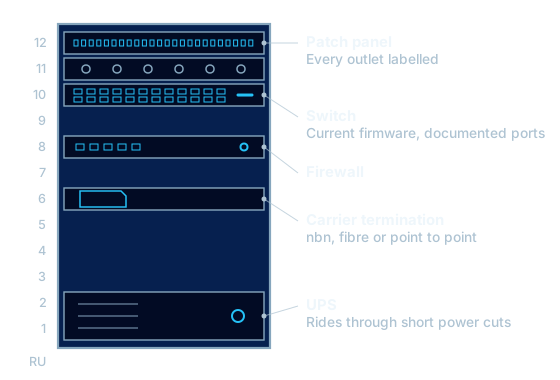
Most IT problems that seem mysterious turn out to be physical: an unlabelled cable, a switch in a ceiling, an access point behind a filing cabinet.
When the installer and the support team are different companies, each blames the other. We install to a standard we are happy to support, because we are the ones who get the call.
Every job finishes with labelled ports, a tidy rack and documentation showing what is connected to what.
Every installation is quoted as a fixed price after a site visit. These are the three jobs we are asked for most.
Fixed quoteafter site visit
Offices with slow spots, dropouts or more devices than the old router can handle.
Fixed quoteafter site visit
Cupboards full of unlabelled cable that nobody wants to touch.
Fixed quoteafter site visit
New tenancies and relocations with a fixed move-in date.
Quotes list the equipment, the number of outlets and anything excluded, so the price does not move once work starts.
Cable is the part of a network that is hardest to replace later, so it pays to choose the right grade the first time.
| Cable | What it carries | Where we use it |
|---|---|---|
| Cat6 | 1 Gbps to 100 m, and 10 Gbps on shorter runs | Desks, phones and printers in most offices |
| Cat6A | 10 Gbps to 100 m | Wi-Fi access points, new fitouts and links between switches |
| OM4 multimode fibre | 10 Gbps to 400 m | Backbones between floors and comms rooms |
| Single-mode fibre | 10 Gbps and above over kilometres | Between buildings and to carrier equipment |
We walk the site, measure cable runs and confirm rack, power and ceiling access.
You receive a fixed-price scope listing equipment, outlets and what is excluded.
We schedule around your trading hours, complete the work and test every outlet and device.
You receive test results, a port map and network documentation, and our support team takes it from there.
Yes. We specify and supply equipment from business-grade vendors and install it. We can also install equipment you have already purchased, after checking it suits the job.
Yes. We plan cabling, internet, phones and equipment for the new site, coordinate with your builder and landlord, and move and reconnect staff equipment so people can work on day one.
We plan installation and cutover work around your trading hours to keep disruption low. The schedule is agreed with you before work starts.
We start with a survey that measures signal and interference across the floor. The fix is usually better access point placement and cabling to each one, not a more powerful router.
Yes. Equipment we install can be covered under a managed IT agreement, so monitoring, firmware updates and faults are handled by the same team.

Tell us about your site and what you need. We reply with options and pricing in writing.