

Business Basic
$10.50per user, per month (ex GST)
Suitable for
Front-line and part-time staff who work in a browser or on a phone.
- Business email and calendar
- Teams, SharePoint and OneDrive
- Web and mobile Word, Excel and PowerPoint

Microsoft has dozens of plans and add-ons, and most businesses are on the wrong mix. We match a licence to each role, set it up properly and keep it tidy as staff come and go.
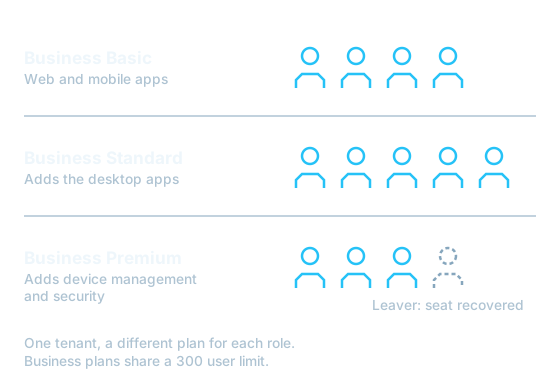
A licence decides more than which apps open. It sets how much mailbox and file storage each person gets, whether laptops can be managed centrally, and which security features protect your accounts.
Over time licences drift. People leave and their seats stay active. Someone on a web-only plan needs desktop Excel and buys a second subscription on a credit card. Security features you already pay for are never switched on.
We review what you hold against what each person does, remove the waste, and configure the features included in the plans you keep.
The three Business plans cover most organisations under 300 people. You can mix them in one tenant, so each person gets the plan their role needs.
$10.50per user, per month (ex GST)
Front-line and part-time staff who work in a browser or on a phone.
$21.00per user, per month (ex GST)
Office staff who need the full desktop apps.
$32.90per user, per month (ex GST)
Anyone with a laptop who handles client or financial data.
Microsoft's Australian list prices on an annual commitment, excluding GST. Monthly terms cost more. Enterprise, frontline and Copilot licences are quoted on request, and setup or migration work is quoted separately.
A typical office does not need the same licence for everyone. This is the mix we most often recommend.
| Role | Plan | Why |
|---|---|---|
| Reception, warehouse and field staff | Business Basic | Email, Teams and web apps on a shared PC or phone. |
| Office and admin staff on desktops | Business Standard | Full Word, Excel and Outlook for daily work. |
| Managers, finance and anyone on a laptop | Business Premium | The device can be managed, encrypted and wiped if lost. |
| Shared mailboxes such as accounts@ | No licence needed | Shared mailboxes under 50 GB are free with any paid plan. |
We connect to your tenant with read access and report on every licence and who holds it.
You receive a plan for each role with the monthly cost before and after.
We move the licences to our management. Mailboxes, files and Teams stay exactly where they are.
We adjust seats as staff change and review the mix with you through the year.
Business Basic gives each user business email, Teams, OneDrive storage and the web and mobile versions of the Office apps. Business Standard adds the desktop apps such as Word, Excel and Outlook. Business Premium adds device management with Intune and advanced security including Defender for Business. The Business plans share a combined limit of 300 users per organisation.
Yes. Each person can hold a different plan in the same tenant. A common mix is Premium for office staff with laptops and Basic or a frontline plan for people who only need email and Teams.
No. Your tenant, mailboxes, Teams and files stay where they are. Only the billing and management relationship changes, and we schedule the transfer so there is no gap in licensing.
An annual commitment costs less per user but fixes your seat count for the term. Monthly terms cost more and let you reduce seats at any renewal. Many businesses use annual for core staff and monthly for seasonal or contract roles.
The Business plans share a ceiling of 300 users. Organisations above that size, or those needing features such as advanced compliance, eDiscovery or larger mailbox archives, usually move to Microsoft 365 E3 or E5.

Tell us about your site and what you need. We reply with options and pricing in writing.